Le Forum
Vous n'êtes pas identifié.
Pages: 1
- Index
- » Ordinateurs why!
- » [Non-résolu] impossible de monter une partition 24.04 de type LVM
#1 26 Feb 2025 13:59:56
- François Marthaler
- Modérateur

- Lieu: Prilly
- Date d'inscription: 07 Sep 2013
- Messages: 3055
- Site web
[Non-résolu] impossible de monter une partition 24.04 de type LVM
Bonjour,
Un client nous a commandé un laptop why! NS51AU-i7 avec un dual boot Windows 11 Pro et Ubuntu 22.04, chaque OS se trouvant sur un SSD M.2 de 2 TB. Il nous a demandé de lui fournir une clé USB pour réinstaller Ubuntu 22.04. Il semble que cette installation ait été faite sur le disque contenant le système Windows avec un système de fichiers LVM2_member. Il a pu paramétrer son système Ubuntu, en particulier ses différentes messageries sur Thunderbird.
Il nous a renvoyé la machine en nous priant d'installer sa session Ubuntu sur un disque et de réinstaller Windows 11 sur l'autre disque.
Comme j'y ai passé finalement au moins 15 heures, je ne me souviens pas très bien de tout ce que j'ai fait, mais je me souviens d'avoir pu mettre à niveau son OS Ubuntu vers 24.04.2 et réinstaller Windows sur l'autre disque, après avoir débloqué le système.
Voici ce que m'indiquait l'utilitaire de disques Ubuntu pour le disque en question:
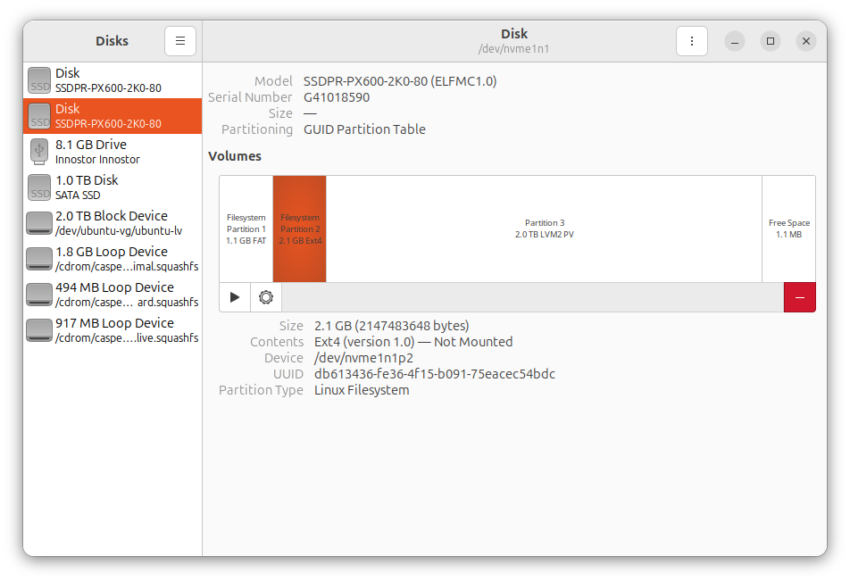
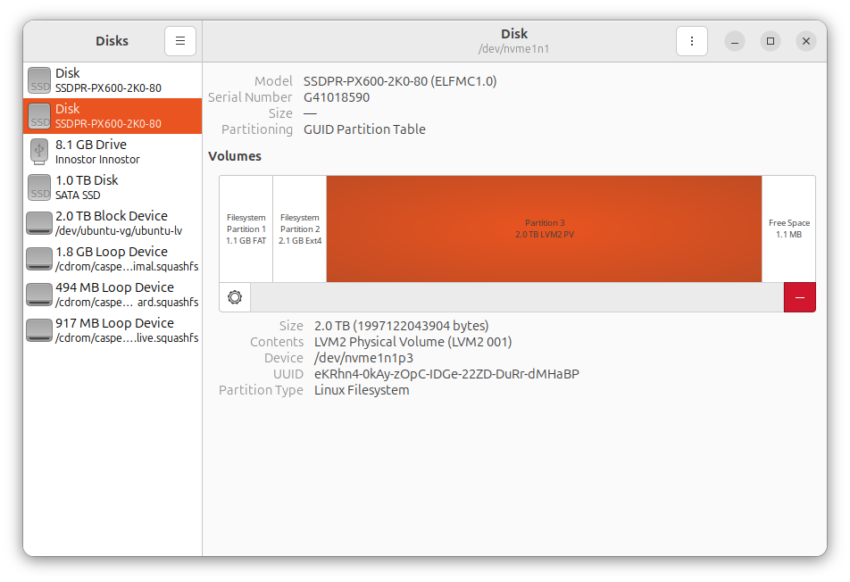
Avec une clé live-USB Ubuntu 22.04, j'ai pu obtenir d'autres informations sur ce disque: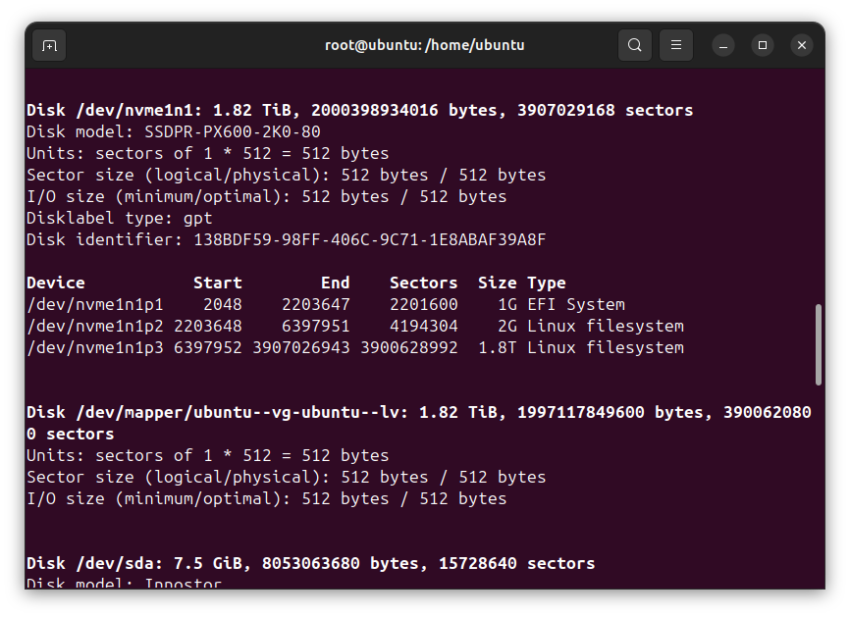
Par deux fois, j'ai tenté de réparer le système avec BootRepair, en prenant la peine de sauvegarder les rapports:
Code:
boot-repair-4ppa2081                                              [20250223_1112]

============================== Boot Info Summary ===============================

 => No boot loader is installed in the MBR of /dev/nvme0n1.
 => No boot loader is installed in the MBR of /dev/nvme1n1.
 => Grub2 (v2.00) is installed in the MBR of /dev/sda and looks at sector 1 of
    the same hard drive for core.img. core.img is at this location and looks
    for (,2)/grub. It also embeds following components:

    modules
    ---------------------------------------------------------------------------
    offsetio extcmd macho elf file gettext boot bufio verifiers crypto
    terminal normal datetime date mmap drivemap blocklist archelp newc
    vga_text relocator video chain ntldr search_label search_fs_file
    search_fs_uuid search keylayouts at_keyboard pci usb usb_keyboard gcry_md5
    hashsum gcry_crc gzio xzio lzopio lspci fshelp ext2 xfs acpi reboot
    iso9660 gcry_sha1 div udf exfat font diskfilter raid6rec zstd btrfs ventoy
    read halt video_fb vbe linux linux16 test true sleep echo bitmap gfxterm
    bitmap_scale trig video_colors gfxmenu videotest videoinfo functional_test
    videotest_checksum video_cirrus video_bochs vga minicmd help configfile tr
    biosdisk disk ls tar zfs squash4 pbkdf2 gcry_sha512 password_pbkdf2
    all_video png jpeg part_gpt part_msdos fat ntfs loopback
    gfxterm_background procfs gfxterm_menu smbios
    ---------------------------------------------------------------------------

nvme0n1p1: _____________________________________________________________________

    File system:       vfat
    Boot sector type:  FAT32
    Boot sector info:  No errors found in the Boot Parameter Block.
    Operating System:
    Boot files:        /efi/Boot/bootx64.efi
                       /efi/Microsoft/Boot/SecureBootRecovery.efi
                       /efi/Microsoft/Boot/bootmgfw.efi
                       /efi/Microsoft/Boot/bootmgr.efi

nvme0n1p2: _____________________________________________________________________

    File system:
    Boot sector type:  -
    Boot sector info:

nvme0n1p3: _____________________________________________________________________

    File system:       ntfs
    Boot sector type:  NTFS
    Boot sector info:  No errors found in the Boot Parameter Block.
    Operating System:  Windows 10 or 11
    Boot files:        /Windows/System32/winload.exe

nvme0n1p4: _____________________________________________________________________

    File system:       ntfs
    Boot sector type:  NTFS
    Boot sector info:  No errors found in the Boot Parameter Block.
    Operating System:
    Boot files:

nvme1n1p1: _____________________________________________________________________

    File system:       vfat
    Boot sector type:  FAT32
    Boot sector info:  No errors found in the Boot Parameter Block.
    Operating System:
    Boot files:        /efi/BOOT/fbx64.efi /efi/BOOT/mmx64.efi
                       /efi/ubuntu/grubx64.efi /efi/ubuntu/mmx64.efi
                       /efi/ubuntu/shimx64.efi /efi/ubuntu/grub.cfg

nvme1n1p2: _____________________________________________________________________

    File system:       ext4
    Boot sector type:  -
    Boot sector info:
    Operating System:
    Boot files:        /grub/grub.cfg

nvme1n1p3: _____________________________________________________________________

    File system:       LVM2_member
    Boot sector type:  -
    Boot sector info:

sda1: __________________________________________________________________________

    File system:       exfat
    Boot sector type:  -
    Boot sector info:
    Mounting failed:   mount: /mnt/BootInfo/sda1: /dev/sda1 already mounted or mount point busy.

sda2: __________________________________________________________________________

    File system:       iso9660
    Boot sector type:  Unknown
    Boot sector info:
    Operating System:
    Boot files:        /boot/grub/grub.cfg


================================ 2 OS detected =================================

OS#1 (linux):   Ubuntu 24.04.2 LTS on mapper/ubuntu--vg-ubuntu--lv
OS#2 (windows):   Windows 10 or 11 on nvme0n1p3

================================ Host/Hardware =================================

CPU architecture: 64-bit
Video: Intel Corporation EFI VGA from Intel Corporation
Live-session OS is Linuxmint 64-bit (Linux Mint 21.2, victoria, x86_64)

===================================== UEFI =====================================

BIOS/UEFI firmware: 1.07.09TOCS1(7.9) from INSYDE Corp.
The firmware is EFI-compatible, and is set in EFI-mode for this live-session.
SecureBoot disabled (confirmed by mokutil).
BootCurrent: 0001
Timeout: 0 seconds
BootOrder: 0000,0002,2001,2002,2003
Boot0000* ubuntu    HD(1,GPT,edf13e4d-4919-4e01-92b9-1fdb71748374,0x800,0x219800)/File(\EFI\ubuntu\shimx64.efi)
Boot0001* EFI USB Device (InnostorInnostor)    UsbWwid(1f75,917,0,15612638177463)/HD(2,MBR,0x7ec7385e,0xef0000,0x10000)RC
Boot0002* Windows Boot Manager    HD(1,GPT,d58ef5ae-74c8-4321-b420-9417af22a515,0x800,0x32000)/File(\EFI\Microsoft\Boot\bootmgfw.efi)WINDOWS.........x...B.C.D.O.B.J.E.C.T.=.{.9.d.e.a.8.6.2.c.-.5.c.d.d.-.4.e.7.0.-.a.c.c.1.-.f.3.2.b.3.4.4.d.4.7.9.5.}....................
Boot2001* EFI USB Device    RC
Boot2002* EFI DVD/CDROM    RC
Boot2003* EFI Network    RC

17b3fa127f74e0189c6192a80c3fe28f   nvme0n1p1/Boot/bootx64.efi
23837e7f81b5b729c2cc673d3da56273   nvme0n1p1/Microsoft/Boot/SecureBootRecovery.efi
17b3fa127f74e0189c6192a80c3fe28f   nvme0n1p1/Microsoft/Boot/bootmgfw.efi
3134a3c759cae87284e8e37d6b841318   nvme0n1p1/Microsoft/Boot/bootmgr.efi
39bc76ff6662f4fbe9aa116e4c997b41   nvme1n1p1/BOOT/fbx64.efi
4ba5a5aad43c197e9fb58b76b404d287   nvme1n1p1/BOOT/mmx64.efi
df697393036a90b6a84d524ce39ec945   nvme1n1p1/ubuntu/grubx64.efi
4ba5a5aad43c197e9fb58b76b404d287   nvme1n1p1/ubuntu/mmx64.efi
07e25dcaf57c776875f78fa36827c58e   nvme1n1p1/ubuntu/shimx64.efi
07e25dcaf57c776875f78fa36827c58e   nvme1n1p1/BOOT/BOOTX64.efi

============================= Drive/Partition Info =============================

Disks info: ____________________________________________________________________

nvme0n1    : is-GPT,    no-BIOSboot,    has---ESP,     not-usb,    not-mmc, has-os,    has-win,    2048 sectors * 512 bytes
nvme1n1    : is-GPT,    no-BIOSboot,    has---ESP,     not-usb,    not-mmc, no-os,    no-wind,    2048 sectors * 512 bytes

Partitions info (1/3): _________________________________________________________

nvme0n1p3    : is-os,    64, nopakmgr,    no-docgrub,    nogrub,    nogrubinstall,    no-grubenv,    noupdategrub,    end-after-100GB
nvme0n1p1    : no-os,    64, nopakmgr,    no-docgrub,    nogrub,    nogrubinstall,    no-grubenv,    noupdategrub,    not-far
nvme0n1p4    : no-os,    64, nopakmgr,    no-docgrub,    nogrub,    nogrubinstall,    no-grubenv,    noupdategrub,    end-after-100GB
nvme1n1p2    : no-os,    64, nopakmgr,    no-docgrub,    nogrub,    nogrubinstall,    grubenv-ok,    noupdategrub,    not-far
nvme1n1p1    : no-os,    64, nopakmgr,    no-docgrub,    nogrub,    nogrubinstall,    no-grubenv,    noupdategrub,    not-far

Partitions info (2/3): _________________________________________________________

nvme0n1p3    : isnotESP,    part-has-no-fstab,    no-nt,    haswinload,    no-recov-nor-hid,    no-bmgr,    notwinboot, ntfs
nvme0n1p1    : is---ESP,    part-has-no-fstab,    no-nt,    no-winload,    no-recov-nor-hid,    no-bmgr,    notwinboot, vfat
nvme0n1p4    : isnotESP,    part-has-no-fstab,    no-nt,    no-winload,    recovery-or-hidden,    no-bmgr,    notwinboot, ntfs
nvme1n1p2    : isnotESP,    part-has-no-fstab,    no-nt,    no-winload,    no-recov-nor-hid,    no-bmgr,    notwinboot, ext4
nvme1n1p1    : is---ESP,    part-has-no-fstab,    no-nt,    no-winload,    no-recov-nor-hid,    no-bmgr,    notwinboot, vfat

Partitions info (3/3): _________________________________________________________

nvme0n1p3    : not--sepboot,    no---boot,    part-has-no-fstab,    not-sep-usr,    no---usr,    part-has-no-fstab,    no--grub.d,    nvme0n1
nvme0n1p1    : not--sepboot,    no---boot,    part-has-no-fstab,    not-sep-usr,    no---usr,    part-has-no-fstab,    no--grub.d,    nvme0n1
nvme0n1p4    : not--sepboot,    no---boot,    part-has-no-fstab,    not-sep-usr,    no---usr,    part-has-no-fstab,    no--grub.d,    nvme0n1
nvme1n1p2    : is---sepboot,    no---boot,    part-has-no-fstab,    not-sep-usr,    no---usr,    part-has-no-fstab,    no--grub.d,    nvme1n1
nvme1n1p1    : not--sepboot,    no---boot,    part-has-no-fstab,    not-sep-usr,    no---usr,    part-has-no-fstab,    no--grub.d,    nvme1n1

fdisk -l (filtered): ___________________________________________________________

Disk nvme0n1: 1.82 TiB, 2000398934016 bytes, 3907029168 sectors
Disk identifier: 28C765DF-5222-46B1-97BA-BD8DB737688D
              Start        End    Sectors  Size Type
nvme0n1p1       2048     206847     204800  100M EFI System
nvme0n1p2     206848     239615      32768   16M Microsoft reserved
nvme0n1p3     239616 3905679359 3905439744  1.8T Microsoft basic data
nvme0n1p4 3905679360 3907026943    1347584  658M Windows recovery environment
Disk nvme1n1: 1.82 TiB, 2000398934016 bytes, 3907029168 sectors
Disk identifier: 138BDF59-98FF-406C-9C71-1E8ABAF39A8F
           Start        End    Sectors  Size Type
nvme1n1p1    2048    2203647    2201600    1G EFI System
nvme1n1p2 2203648    6397951    4194304    2G Linux filesystem
nvme1n1p3 6397952 3907026943 3900628992  1.8T Linux filesystem
Disk mapper/ubuntu--vg-ubuntu--lv: 1.82 TiB, 1997117849600 bytes, 3900620800 sectors
Disk sda: 7.5 GiB, 8053063680 bytes, 15728640 sectors
Disk identifier: 0x7ec7385e
     Boot    Start      End  Sectors  Size Id Type
sda1  *        2048 15663103 15661056  7.5G  7 HPFS/NTFS/exFAT
sda2       15663104 15728639    65536   32M ef EFI (FAT-12/16/32)
Disk mapper/ventoy: 2.45 GiB, 2630877184 bytes, 5138432 sectors
Disk identifier: 0x14eb2669
                   Boot Start     End Sectors  Size Id Type
mapper/ventoy-part1 *        0 5138431 5138432  2.5G  0 Empty
mapper/ventoy-part2        572    9067    8496  4.1M ef EFI (FAT-12/16/32)

parted -lm (filtered): _________________________________________________________

sda:8053MB:scsi:512:512:msdos:Innostor Innostor:;
1:1049kB:8020MB:8018MB:::boot;
2:8020MB:8053MB:33.6MB:fat16::esp;
mapper/ventoy:2631MB:dm:512:512:msdos:Linux device-mapper (linear):;
2:293kB:4643kB:4350kB:::esp;
mapper/ubuntu--vg-ubuntu--lv:1997GB:dm:512:512:loop:Linux device-mapper (linear):;
1:0.00B:1997GB:1997GB:ext4::;
nvme0n1:2000GB:nvme:512:512:gpt:SSDPR-PX600-2K0-80:;
1:1049kB:106MB:105MB:fat32:Basic data partition:boot, esp;
2:106MB:123MB:16.8MB::Microsoft reserved partition:msftres;
3:123MB:2000GB:2000GB:ntfs:Basic data partition:msftdata;
4:2000GB:2000GB:690MB:ntfs::hidden, diag;
nvme1n1:2000GB:nvme:512:512:gpt:SSDPR-PX600-2K0-80:;
1:1049kB:1128MB:1127MB:fat32::boot, esp;
2:1128MB:3276MB:2147MB:ext4::;
3:3276MB:2000GB:1997GB:::;

blkid (filtered): ______________________________________________________________

NAME                      FSTYPE      UUID                                   PARTUUID                             LABEL                  PARTLABEL
sda
├─sda1                    exfat       422E-9085                              7ec7385e-01                          Ventoy
│ └─ventoy
└─sda2                    iso9660     2023-12-23-05-05-55-00                                                      Boot-Repair-Disk 64bit
nvme0n1
├─nvme0n1p1               vfat        64A6-7397                              d58ef5ae-74c8-4321-b420-9417af22a515                        Basic data partition
├─nvme0n1p2                                                                  bd794e78-357c-4eb7-8128-505ac1dd8de8                        Microsoft reserved partition
├─nvme0n1p3               ntfs        16DEA863DEA83D3D                       fa42bdc5-9619-464d-beb5-aa89dddff280                        Basic data partition
└─nvme0n1p4               ntfs        D6D01DBED01DA631                       b2452d44-9b36-418a-87d6-9b8d34ec59dd
nvme1n1
├─nvme1n1p1               vfat        5A3A-E61C                              edf13e4d-4919-4e01-92b9-1fdb71748374
├─nvme1n1p2               ext4        db613436-fe36-4f15-b091-75eacec54bdc   09ca7dbe-43db-4e83-b3fe-383a1af8e0c7
└─nvme1n1p3               LVM2_member eKRhn4-0kAy-zOpC-IDGe-22ZD-DuRr-dMHaBP 459a5b01-a9f2-4853-beee-be8394b9534d
  └─ubuntu--vg-ubuntu--lv ext4        37a80c1b-50c4-4804-b5c9-df37114c35cf

Mount points (filtered): _______________________________________________________

                    Avail Use% Mounted on
/dev/mapper/ventoy      0 100% /cdrom
/dev/nvme0n1p1      62.8M  35% /mnt/boot-sav/nvme0n1p1
/dev/nvme0n1p3       1.8T   3% /mnt/boot-sav/nvme0n1p3
/dev/nvme0n1p4     119.5M  82% /mnt/boot-sav/nvme0n1p4
/dev/nvme1n1p1         1G   1% /mnt/boot-sav/nvme1n1p1
/dev/nvme1n1p2       1.6G  10% /mnt/boot-sav/nvme1n1p2
/dev/sda2               0 100% /media/mint/Boot-Repair-Disk 64bit

Mount options (filtered): ______________________________________________________

/dev/mapper/ventoy iso9660         ro,noatime,nojoliet,check=s,map=n,blocksize=2048,iocharset=utf8
/dev/nvme0n1p1     vfat            rw,relatime,fmask=0022,dmask=0022,codepage=437,iocharset=iso8859-1,shortname=mixed,errors=remount-ro
/dev/nvme0n1p3     fuseblk         ro,relatime,user_id=0,group_id=0,allow_other,blksize=4096
/dev/nvme0n1p4     fuseblk         ro,relatime,user_id=0,group_id=0,allow_other,blksize=4096
/dev/nvme1n1p1     vfat            rw,relatime,fmask=0022,dmask=0022,codepage=437,iocharset=iso8859-1,shortname=mixed,errors=remount-ro
/dev/nvme1n1p2     ext4            rw,relatime
/dev/sda2          iso9660         ro,nosuid,nodev,relatime,nojoliet,check=s,map=n,blocksize=2048,iocharset=utf8

============================== ls -R /dev/mapper/ ==============================

/dev/mapper:
control
ubuntu--vg-ubuntu--lv
ventoy

=================== nvme1n1p1/efi/ubuntu/grub.cfg (filtered) ===================

search.fs_uuid b1462a3d-f8a2-462f-838f-521cfbc567bb root lvmid/ctsRvO-J9CK-GcaK-f9eB-GXoI-xjCg-fIqnDW/x9AzX8-1WK8-UcPJ-cjnR-MTcU-d28D-9nNIll
set prefix=($root)'/boot/grub'
configfile $prefix/grub.cfg

====================== nvme1n1p2/grub/grub.cfg (filtered) ======================

Ubuntu   37a80c1b-50c4-4804-b5c9-df37114c35cf
Windows Boot Manager (on nvme1n1p1)   osprober-efi-5CF4-A91A
Ubuntu 22.04.5 LTS (22.04) (on mapper/vgubuntu-root)   b1462a3d-f8a2-462f-838f-521cfbc567bb
### END /etc/grub.d/30_os-prober ###
UEFI Firmware Settings   uefi-firmware
### END /etc/grub.d/30_uefi-firmware ###

================= nvme1n1p2: Location of files loaded by Grub ==================

           GiB - GB             File                                 Fragment(s)
   1.203136444 = 1.291857920    grub/grub.cfg                                  1
   2.815067291 = 3.022655488    vmlinuz                                        1
   2.815067291 = 3.022655488    vmlinuz-6.11.0-17-generic                      1
   2.963157654 = 3.181666304    vmlinuz-6.8.0-51-generic                       1
   2.963157654 = 3.181666304    vmlinuz.old                                    1
   2.925777435 = 3.141529600    initrd.img                                     2
   2.925777435 = 3.141529600    initrd.img-6.11.0-17-generic                   2
   3.030277252 = 3.253735424    initrd.img-6.8.0-51-generic                    1
   3.030277252 = 3.253735424    initrd.img.old                                 1

====================== sda2/boot/grub/grub.cfg (filtered) ======================


==================== sda2: Location of files loaded by Grub ====================

           GiB - GB             File                                 Fragment(s)
            ?? = ??             boot/grub/grub.cfg                             1

======================== Unknown MBRs/Boot Sectors/etc =========================


/dev/nvme0n1p1: unknown GPT attributes
8000000000000000

/dev/nvme0n1p2: unknown GPT attributes
8000000000000000

/dev/nvme0n1p3: unknown GPT attributes
8000000000000000

/dev/nvme0n1p4: unknown GPT attributes
8000000000000001
Unknown BootLoader on sda2


================================= User choice ==================================

Is there RAID on this computer? no


==================== blkid (filtered) before lvm activation ====================

/dev/dm-1: BLOCK_SIZE="2048" UUID="2023-12-23-05-05-55-00" LABEL="Boot-Repair-Disk 64bit" TYPE="iso9660" PTUUID="14eb2669" PTTYPE="dos"
/dev/nvme0n1p3: BLOCK_SIZE="512" UUID="16DEA863DEA83D3D" TYPE="ntfs" PARTLABEL="Basic data partition" PARTUUID="fa42bdc5-9619-464d-beb5-aa89dddff280"
/dev/nvme0n1p1: UUID="64A6-7397" BLOCK_SIZE="512" TYPE="vfat" PARTLABEL="Basic data partition" PARTUUID="d58ef5ae-74c8-4321-b420-9417af22a515"
/dev/nvme0n1p4: BLOCK_SIZE="512" UUID="D6D01DBED01DA631" TYPE="ntfs" PARTUUID="b2452d44-9b36-418a-87d6-9b8d34ec59dd"
/dev/mapper/ubuntu--vg-ubuntu--lv: UUID="37a80c1b-50c4-4804-b5c9-df37114c35cf" BLOCK_SIZE="4096" TYPE="ext4"
/dev/nvme1n1p2: UUID="db613436-fe36-4f15-b091-75eacec54bdc" BLOCK_SIZE="4096" TYPE="ext4" PARTUUID="09ca7dbe-43db-4e83-b3fe-383a1af8e0c7"
/dev/nvme1n1p3: UUID="eKRhn4-0kAy-zOpC-IDGe-22ZD-DuRr-dMHaBP" TYPE="LVM2_member" PARTUUID="459a5b01-a9f2-4853-beee-be8394b9534d"
/dev/nvme1n1p1: UUID="5A3A-E61C" BLOCK_SIZE="512" TYPE="vfat" PARTUUID="edf13e4d-4919-4e01-92b9-1fdb71748374"
/dev/sda1: LABEL="Ventoy" UUID="422E-9085" BLOCK_SIZE="512" TYPE="exfat" PTTYPE="dos" PARTUUID="7ec7385e-01"
/dev/nvme0n1p2: PARTLABEL="Microsoft reserved partition" PARTUUID="bd794e78-357c-4eb7-8128-505ac1dd8de8"


================================ LVM activation ================================

modprobe dm-mod
vgscan --mknodes
  Found volume group "ubuntu-vg" using metadata type lvm2
vgchange -ay
  1 logical volume(s) in volume group "ubuntu-vg" now active
lvscan
  ACTIVE            '/dev/ubuntu-vg/ubuntu-lv' [<1.82 TiB] inherit
blkid -g


Suggested repair: ______________________________________________________________

The default repair of the Boot-Repair utility would not act on the MBR.
Additional repair would be performed:  win-legacy-basic-fix
Code:
boot-repair-4ppa2081                                              [20250224_1413]

============================== Boot Info Summary ===============================

 => No boot loader is installed in the MBR of /dev/nvme0n1.
 => Grub2 (v2.00) is installed in the MBR of /dev/sda and looks at sector 1 of
    the same hard drive for core.img. core.img is at this location and looks
    for (,2)/grub. It also embeds following components:

    modules
    ---------------------------------------------------------------------------
    offsetio extcmd macho elf file gettext boot bufio verifiers crypto
    terminal normal datetime date mmap drivemap blocklist archelp newc
    vga_text relocator video chain ntldr search_label search_fs_file
    search_fs_uuid search keylayouts at_keyboard pci usb usb_keyboard gcry_md5
    hashsum gcry_crc gzio xzio lzopio lspci fshelp ext2 xfs acpi reboot
    iso9660 gcry_sha1 div udf exfat font diskfilter raid6rec zstd btrfs ventoy
    read halt video_fb vbe linux linux16 test true sleep echo bitmap gfxterm
    bitmap_scale trig video_colors gfxmenu videotest videoinfo functional_test
    videotest_checksum video_cirrus video_bochs vga minicmd help configfile tr
    biosdisk disk ls tar zfs squash4 pbkdf2 gcry_sha512 password_pbkdf2
    all_video png jpeg part_gpt part_msdos fat ntfs loopback
    gfxterm_background procfs gfxterm_menu smbios
    ---------------------------------------------------------------------------

nvme0n1p1: _____________________________________________________________________

    File system:       vfat
    Boot sector type:  FAT32
    Boot sector info:  No errors found in the Boot Parameter Block.
    Operating System:
    Boot files:        /efi/BOOT/fbx64.efi /efi/BOOT/mmx64.efi
                       /efi/ubuntu/grubx64.efi /efi/ubuntu/mmx64.efi
                       /efi/ubuntu/shimx64.efi /efi/ubuntu/grub.cfg

nvme0n1p2: _____________________________________________________________________

    File system:       ext4
    Boot sector type:  -
    Boot sector info:
    Operating System:
    Boot files:        /grub/grub.cfg

nvme0n1p3: _____________________________________________________________________

    File system:       LVM2_member
    Boot sector type:  -
    Boot sector info:

sda1: __________________________________________________________________________

    File system:       exfat
    Boot sector type:  -
    Boot sector info:
    Mounting failed:   mount: /mnt/BootInfo/sda1: /dev/sda1 already mounted or mount point busy.

sda2: __________________________________________________________________________

    File system:       iso9660
    Boot sector type:  Unknown
    Boot sector info:
    Operating System:
    Boot files:        /boot/grub/grub.cfg


================================ 1 OS detected =================================

OS#1 (linux):   Ubuntu 24.04.2 LTS on mapper/ubuntu--vg-ubuntu--lv

================================ Host/Hardware =================================

CPU architecture: 64-bit
Video: Intel Corporation EFI VGA from Intel Corporation
Live-session OS is Linuxmint 64-bit (Linux Mint 21.2, victoria, x86_64)

===================================== UEFI =====================================

BIOS/UEFI firmware: 1.07.09TOCS1(7.9) from INSYDE Corp.
The firmware is EFI-compatible, and is set in EFI-mode for this live-session.
SecureBoot disabled (confirmed by mokutil).
BootCurrent: 0001
Timeout: 0 seconds
BootOrder: 0000,2001,2002,2003
Boot0000* ubuntu    HD(1,GPT,edf13e4d-4919-4e01-92b9-1fdb71748374,0x800,0x219800)/File(\EFI\ubuntu\shimx64.efi)RC
Boot0001* EFI USB Device (InnostorInnostor)    UsbWwid(1f75,917,0,15612638177463)/HD(2,MBR,0x7ec7385e,0xef0000,0x10000)RC
Boot2001* EFI USB Device    RC
Boot2002* EFI DVD/CDROM    RC
Boot2003* EFI Network    RC

39bc76ff6662f4fbe9aa116e4c997b41   nvme0n1p1/BOOT/fbx64.efi
4ba5a5aad43c197e9fb58b76b404d287   nvme0n1p1/BOOT/mmx64.efi
df697393036a90b6a84d524ce39ec945   nvme0n1p1/ubuntu/grubx64.efi
4ba5a5aad43c197e9fb58b76b404d287   nvme0n1p1/ubuntu/mmx64.efi
07e25dcaf57c776875f78fa36827c58e   nvme0n1p1/ubuntu/shimx64.efi
07e25dcaf57c776875f78fa36827c58e   nvme0n1p1/BOOT/BOOTX64.efi

============================= Drive/Partition Info =============================

Disks info: ____________________________________________________________________

nvme0n1    : is-GPT,    no-BIOSboot,    has---ESP,     not-usb,    not-mmc, no-os,    no-wind,    2048 sectors * 512 bytes

Partitions info (1/3): _________________________________________________________

nvme0n1p1    : no-os,    64, nopakmgr,    no-docgrub,    nogrub,    nogrubinstall,    no-grubenv,    noupdategrub,    not-far
nvme0n1p2    : no-os,    64, nopakmgr,    no-docgrub,    nogrub,    nogrubinstall,    grubenv-ok,    noupdategrub,    not-far

Partitions info (2/3): _________________________________________________________

nvme0n1p1    : is---ESP,    part-has-no-fstab,    no-nt,    no-winload,    no-recov-nor-hid,    no-bmgr,    notwinboot, vfat
nvme0n1p2    : isnotESP,    part-has-no-fstab,    no-nt,    no-winload,    no-recov-nor-hid,    no-bmgr,    notwinboot, ext4

Partitions info (3/3): _________________________________________________________

nvme0n1p1    : not--sepboot,    no---boot,    part-has-no-fstab,    not-sep-usr,    no---usr,    part-has-no-fstab,    no--grub.d,    nvme0n1
nvme0n1p2    : is---sepboot,    no-kernel,    part-has-no-fstab,    not-sep-usr,    no---usr,    part-has-no-fstab,    no--grub.d,    nvme0n1

fdisk -l (filtered): ___________________________________________________________

Disk nvme0n1: 1.82 TiB, 2000398934016 bytes, 3907029168 sectors
Disk identifier: 138BDF59-98FF-406C-9C71-1E8ABAF39A8F
           Start        End    Sectors  Size Type
nvme0n1p1    2048    2203647    2201600    1G EFI System
nvme0n1p2 2203648    6397951    4194304    2G Linux filesystem
nvme0n1p3 6397952 3907026943 3900628992  1.8T Linux filesystem
Disk mapper/ubuntu--vg-ubuntu--lv: 1.82 TiB, 1997117849600 bytes, 3900620800 sectors
Disk sda: 7.5 GiB, 8053063680 bytes, 15728640 sectors
Disk identifier: 0x7ec7385e
     Boot    Start      End  Sectors  Size Id Type
sda1  *        2048 15663103 15661056  7.5G  7 HPFS/NTFS/exFAT
sda2       15663104 15728639    65536   32M ef EFI (FAT-12/16/32)
Disk mapper/ventoy: 2.45 GiB, 2630877184 bytes, 5138432 sectors
Disk identifier: 0x14eb2669
                   Boot Start     End Sectors  Size Id Type
mapper/ventoy-part1 *        0 5138431 5138432  2.5G  0 Empty
mapper/ventoy-part2        572    9067    8496  4.1M ef EFI (FAT-12/16/32)

parted -lm (filtered): _________________________________________________________

sda:8053MB:scsi:512:512:msdos:Innostor Innostor:;
1:1049kB:8020MB:8018MB:::boot;
2:8020MB:8053MB:33.6MB:fat16::esp;
mapper/ventoy:2631MB:dm:512:512:msdos:Linux device-mapper (linear):;
2:293kB:4643kB:4350kB:::esp;
mapper/ubuntu--vg-ubuntu--lv:1997GB:dm:512:512:loop:Linux device-mapper (linear):;
1:0.00B:1997GB:1997GB:ext4::;
nvme0n1:2000GB:nvme:512:512:gpt:SSDPR-PX600-2K0-80:;
1:1049kB:1128MB:1127MB:fat32::boot, esp;
2:1128MB:3276MB:2147MB:ext4::;
3:3276MB:2000GB:1997GB:::;

blkid (filtered): ______________________________________________________________

NAME                      FSTYPE      UUID                                   PARTUUID                             LABEL                  PARTLABEL
sda
├─sda1                    exfat       422E-9085                              7ec7385e-01                          Ventoy
│ └─ventoy
└─sda2                    iso9660     2023-12-23-05-05-55-00                                                      Boot-Repair-Disk 64bit
nvme0n1
├─nvme0n1p1               vfat        5A3A-E61C                              edf13e4d-4919-4e01-92b9-1fdb71748374
├─nvme0n1p2               ext4        db613436-fe36-4f15-b091-75eacec54bdc   09ca7dbe-43db-4e83-b3fe-383a1af8e0c7
└─nvme0n1p3               LVM2_member eKRhn4-0kAy-zOpC-IDGe-22ZD-DuRr-dMHaBP 459a5b01-a9f2-4853-beee-be8394b9534d
  └─ubuntu--vg-ubuntu--lv ext4        37a80c1b-50c4-4804-b5c9-df37114c35cf

Mount points (filtered): _______________________________________________________

                   Avail Use% Mounted on
/dev/mapper/ventoy     0 100% /cdrom
/dev/nvme0n1p1        1G   1% /mnt/boot-sav/nvme0n1p1
/dev/nvme0n1p2      1.6G  10% /mnt/boot-sav/nvme0n1p2
/dev/sda2              0 100% /media/mint/Boot-Repair-Disk 64bit

Mount options (filtered): ______________________________________________________

/dev/mapper/ventoy iso9660         ro,noatime,nojoliet,check=s,map=n,blocksize=2048,iocharset=utf8
/dev/nvme0n1p1     vfat            rw,relatime,fmask=0022,dmask=0022,codepage=437,iocharset=iso8859-1,shortname=mixed,errors=remount-ro
/dev/nvme0n1p2     ext4            rw,relatime
/dev/sda2          iso9660         ro,nosuid,nodev,relatime,nojoliet,check=s,map=n,blocksize=2048,iocharset=utf8

============================== ls -R /dev/mapper/ ==============================

/dev/mapper:
control
ubuntu--vg-ubuntu--lv
ventoy

=================== nvme0n1p1/efi/ubuntu/grub.cfg (filtered) ===================

search.fs_uuid b1462a3d-f8a2-462f-838f-521cfbc567bb root lvmid/ctsRvO-J9CK-GcaK-f9eB-GXoI-xjCg-fIqnDW/x9AzX8-1WK8-UcPJ-cjnR-MTcU-d28D-9nNIll
set prefix=($root)'/boot/grub'
configfile $prefix/grub.cfg

====================== nvme0n1p2/grub/grub.cfg (filtered) ======================

Ubuntu   37a80c1b-50c4-4804-b5c9-df37114c35cf
Windows Boot Manager (on nvme1n1p1)   osprober-efi-5CF4-A91A
Ubuntu 22.04.5 LTS (22.04) (on mapper/vgubuntu-root)   b1462a3d-f8a2-462f-838f-521cfbc567bb
### END /etc/grub.d/30_os-prober ###
UEFI Firmware Settings   uefi-firmware
### END /etc/grub.d/30_uefi-firmware ###

================= nvme0n1p2: Location of files loaded by Grub ==================

           GiB - GB             File                                 Fragment(s)
   1.203136444 = 1.291857920    grub/grub.cfg                                  1
   2.815067291 = 3.022655488    vmlinuz                                        1
   2.815067291 = 3.022655488    vmlinuz-6.11.0-17-generic                      1
   2.963157654 = 3.181666304    vmlinuz-6.8.0-51-generic                       1
   2.963157654 = 3.181666304    vmlinuz.old                                    1
   2.925777435 = 3.141529600    initrd.img                                     2
   2.925777435 = 3.141529600    initrd.img-6.11.0-17-generic                   2
   3.030277252 = 3.253735424    initrd.img-6.8.0-51-generic                    1
   3.030277252 = 3.253735424    initrd.img.old                                 1

====================== sda2/boot/grub/grub.cfg (filtered) ======================


==================== sda2: Location of files loaded by Grub ====================

           GiB - GB             File                                 Fragment(s)
            ?? = ??             boot/grub/grub.cfg                             1

======================== Unknown MBRs/Boot Sectors/etc =========================

Unknown BootLoader on sda2


================================= User choice ==================================

Is there RAID on this computer? no


==================== blkid (filtered) before lvm activation ====================

/dev/dm-1: BLOCK_SIZE="2048" UUID="2023-12-23-05-05-55-00" LABEL="Boot-Repair-Disk 64bit" TYPE="iso9660" PTUUID="14eb2669" PTTYPE="dos"
/dev/nvme0n1p3: UUID="eKRhn4-0kAy-zOpC-IDGe-22ZD-DuRr-dMHaBP" TYPE="LVM2_member" PARTUUID="459a5b01-a9f2-4853-beee-be8394b9534d"
/dev/nvme0n1p1: UUID="5A3A-E61C" BLOCK_SIZE="512" TYPE="vfat" PARTUUID="edf13e4d-4919-4e01-92b9-1fdb71748374"
/dev/nvme0n1p2: UUID="db613436-fe36-4f15-b091-75eacec54bdc" BLOCK_SIZE="4096" TYPE="ext4" PARTUUID="09ca7dbe-43db-4e83-b3fe-383a1af8e0c7"
/dev/mapper/ubuntu--vg-ubuntu--lv: UUID="37a80c1b-50c4-4804-b5c9-df37114c35cf" BLOCK_SIZE="4096" TYPE="ext4"
/dev/sda1: LABEL="Ventoy" UUID="422E-9085" BLOCK_SIZE="512" TYPE="exfat" PTTYPE="dos" PARTUUID="7ec7385e-01"


================================ LVM activation ================================

modprobe dm-mod
vgscan --mknodes
  Found volume group "ubuntu-vg" using metadata type lvm2
vgchange -ay
  1 logical volume(s) in volume group "ubuntu-vg" now active
lvscan
  ACTIVE            '/dev/ubuntu-vg/ubuntu-lv' [<1.82 TiB] inherit
blkid -g


Suggested repair: ______________________________________________________________

The default repair of the Boot-Repair utility would not act on the boot.
J'ai ensuite passé des heures avec ChatGPT pour tenter de monter le système sur /mnt avec une live-USB pour pouvoir mettre à jour le GRUB qui empêchait de démarrer sur la session ou au moins sauvegarder ses données (voir https://chatgpt.com/share/67bf1398-4f7c … 983325897d et https://chatgpt.com/share/67bf1572-2140 … 6353b8ec2d).
Sans succès! 
laptop why! NV41MZ, Intel Core i7-1165G7, RAM 16 Gb, Ubuntu 22.04 LTS
Hors ligne
#2 26 Feb 2025 14:21:56
- François Marthaler
- Modérateur
- Lieu: Prilly
- Date d'inscription: 07 Sep 2013
- Messages: 3055
- Site web
Re: [Non-résolu] impossible de monter une partition 24.04 de type LVM
J'ai fini par réinstaller un build propre Ubuntu 24.04.2 en allemand et Windows 11 Pro avec la clé de licence d'origine.
Il m'a fallu un petit moment pour trouver comment activer OS Prober pour générer un menu GRUB permettant de démarrer sur l'un ou l'autre des systèmes.
Ne reste plus qu'à renvoyer la machine au client, une semaine après qu'il nous l'aie envoyée...
Pouf!
laptop why! NV41MZ, Intel Core i7-1165G7, RAM 16 Gb, Ubuntu 22.04 LTS
Hors ligne
Pages: 1
- Index
- » Ordinateurs why!
- » [Non-résolu] impossible de monter une partition 24.04 de type LVM